
Differences between GOPATH and Go Modules
1. Concepts
-
GOPATH
-
Is Go's early dependency management mechanism.
- All Go projects and dependency packages must be placed in the
GOPATHdirectory (default is~/go). - Must set GO111MODULE=off
- Project paths must be organized according to the
src/package_namestructure. - Does not support version control; dependency management needs to be handled manually (e.g.,
go get). -
The order to find dependency packages is to look in gopath/src, and if not found, then look in the goroot/src directory
-
Go Modules
- Is a modular dependency management mechanism introduced in Go 1.11, enabled by default after Go 1.13.
- Does not rely on
GOPATH; projects can be placed in any directory. - Each project has an independent
go.modfile for managing dependencies and versions. - GO111MODULE=on must be enabled
// vendor
2. Dependency Management
-
GOPATH
-
Dependency packages are uniformly stored in the
pkgdirectory ofGOPATH. - Dependency versions are not fixed; for example, running
go getwill fetch the latest version, making it impossible to lock a specific version. -
Lacks a modular management mechanism, which can lead to dependency conflicts in multiple projects.
-
Go Modules
- Uses
go.modandgo.sumfiles to record dependency and version information. - Supports version control, explicitly specifying dependency versions.
- Supports isolation between modules, avoiding dependency conflicts.
3. Project Organization
-
GOPATH
-
Projects must be located in the
GOPATH/srcdirectory. - Fixed directory structure:
GOPATH/src/github.com/username/project. -
Must set GO11MODULE=off
-
Go Modules
- Projects can be placed in any directory, independent of
GOPATH. - More flexible, developers can freely choose the directory structure.
4. Applicable Scenarios
-
GOPATH
-
Suitable for older Go projects or toolchains.
-
Suitable for simple projects that do not require complex dependency management.
-
Go Modules
- Is the recommended standard for Go, suitable for modern projects.
- More suitable for projects that require dependency version management.
5. Command Differences
-
GOPATH
-
go get: Used to fetch dependencies. -
go build: Finds dependencies inGOPATHand builds. -
Go Modules
go mod init: Initializes a module, generating ago.modfile.go mod tidy: Cleans up and synchronizes dependencies.go mod vendor: Downloads dependencies to thevendordirectory.
Summary
- For new projects, Go Modules should be used as much as possible because it provides more powerful features and flexibility.
- If maintaining old projects, GOPATH might continue to be used.
Go Language Coding Standards
-
Why coding standards are needed
-
Coding standards are not mandatory, meaning that code written without following them will still run perfectly fine.
- The purpose of coding standards is to help teams establish a unified code style, improving code readability, standardization, and consistency. This standard will explain naming conventions, commenting conventions, code style, and commonly used tools provided by the Go language.
- Standards are not unique, meaning that theoretically, each company can formulate its own standards, but generally, the overall differences in standards will not be significant.
2. Coding Standards
1. Naming Conventions
Naming is a very important part of coding standards; unified naming rules help improve code readability. Good naming allows sufficient information to be obtained just from the name.
-
a. When a name (including constants, variables, types, function names, struct fields, etc.) starts with an uppercase letter:
-
For example:
Group1, then objects using this form of identifier can be used by code in external packages (client programs need to import this package first). -
This is called exporting (similar to
publicin object-oriented languages). -
b. If a name starts with a lowercase letter:
- Then it is not visible outside the package, but it is visible and available within the entire package (similar to
privatein object-oriented languages).
1.1 Package Name: package
- Keep the
packagename consistent with the directory name, and try to use meaningful package names. - Short, meaningful, and try not to conflict with the standard library.
- Package names should be lowercase words, without underscores or mixed case.
package model
package main
What is RPC
- RPC (Remote Procedure Call), simply understood as one node requesting a service provided by another node.
- The counterpart to RPC is local procedure call; function calls are the most common procedure calls.
- Transforming local procedure calls into remote procedure calls faces various issues.
- The original local function runs on another server. However, this introduces many new problems.
- Call ID mapping
- Serialization and deserialization (important)
- Network transmission (important)
New Problems Introduced by Remote Procedure Calls
-
Call ID Mapping
-
In local calls, the function body is directly pointed to via a function table.
- In remote calls, all functions must have their own unique ID.
- The client and server each maintain a mapping table of (function <--> Call ID).
-
When the client calls, it needs to find the corresponding Call ID, and the server finds the corresponding function through the Call ID.
-
Serialization and Deserialization
-
The client needs to serialize parameters into a byte stream and pass it to the server.
- The server receives the byte stream and deserializes it into parameters.
-
Calls between different languages require a unified serialization protocol.
-
Network Transmission
- All data needs to be transmitted over the network.
- The network transport layer needs to pass the Call ID and serialized parameters to the server.
- After processing, the server returns the result to the client.
Implementing a simple RPC via HTTP
// server
package main

import (
 "encoding/json"
 "fmt"
 "net/http"
 "strconv"
)

func main() {
 // path 相当于callID
 // 返回格式:json {data:3}
 // http://127.0.0.1:8000/add?a=1&b=2
 // 网络传输协议
 http.HandleFunc("/add", func(w http.ResponseWriter, r *http.Request) {
  _ = r.ParseForm() // 解析参数
  fmt.Println("path:", r.URL.Path)
  aList, aOK := r.Form["a"]
  bList, bOK := r.Form["b"]
  if !aOK || !bOK || len(aList) == 0 || len(bList) == 0 {
   http.Error(w, `{"error":"missing parameter"}`, http.StatusBadRequest)
   return
  }
  a, _ := strconv.Atoi(aList[0])
  b, _ := strconv.Atoi(bList[0])
  w.Header().Set("Content-Type", "application/json; charset=utf-8")
  jData, _ := json.Marshal(map[string]int{
   "data": a + b,
  })
  _, _ = w.Write(jData)
 })
 _ = http.ListenAndServe(":8000", nil)
}
client
// client
package main

import (
 "encoding/json"
 "fmt"
 "github.com/kirinlabs/HttpRequest"
)

type ResponseData struct {
 Data int `json:"data"`
}

// rpc远程过程调用,如何做到像本地调用
func Add(a, b int) int {
 req := HttpRequest.NewRequest()

 res, _ := req.Get(fmt.Sprintf("http://127.0.0.1:8000/%s?a=%d&b=%d", "add", a, b))
 body, _ := res.Body()
 //fmt.Println(string(body))
 rspData := ResponseData{}
 _ = json.Unmarshal(body, &rspData)
 return rspData.Data

}
func main() {
 //conn, err := net.Dial("tcp", "127.0.0.1:8000")
 fmt.Println(Add(1, 2))
}
Four Key Elements of RPC Development
RPC technology consists of four parts in its architectural design: Client, Client Stub, Server, and Server Stub.
-
Client (Client): The initiator of service calls, also known as the service consumer.
-
Client Stub (Client Stub): This program runs on the client's computer and is primarily used to store the address of the server to be called. In addition, this program is responsible for packaging the client's request data for the remote server program into data packets and sending them to the Server Stub program via the network; secondly, it also receives the call result data packets sent by the Server Stub program and parses them to return to the client.
-
Server (Server): A program running on a remote computer, which contains the methods the client wants to call.
-
Server Stub (Server Stub): Receives request message data packets sent by the Client Stub program via the network, calls the actual program function methods in the server to complete the function call; secondly, processes and packages the results of the server's execution and sends them to the Client Stub program.
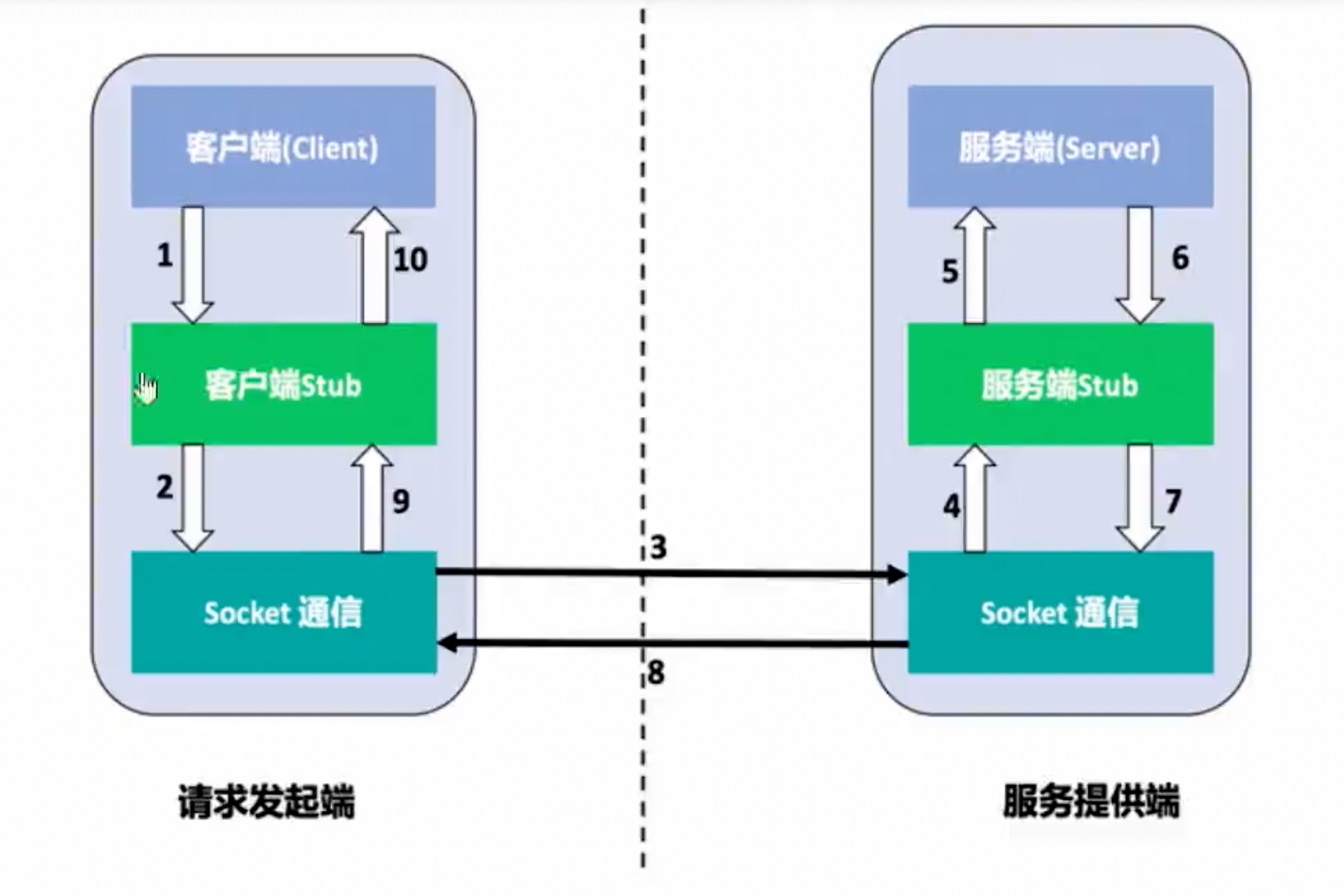
RPC based on Go language package (helloworld)
package main

import (
 "net"
 "net/rpc"
 "net/rpc/jsonrpc"
)

type HelloService struct{}

func (s *HelloService) Hello(request string, reply *string) error {
 *reply = "hello:" + request
 return nil

}

func main() {
 // 启动rpc服务
 // 1. 实例化一个Server
 // 2. 调用Server的Register方法注册rpc服务
 // 3. 调用Server的Serve方法监听端口(启动服务)
 listener, err1 := net.Listen("tcp", ":1234")
 if err1 != nil {
  return
 }

 // go 语言是有一个内置的rpc包的,可以用来实现rpc服务
 err := rpc.RegisterName("HelloService", new(HelloService))
 if err != nil {
  return
 }

 for {
  conn, er := listener.Accept()
  if er != nil {
   return
  }
  go rpc.ServeCodec(jsonrpc.NewServerCodec(conn)) // 当一个新的连接进来的时候,rpc会处理这个连接
 }

}

// python调用rpc服务
//import json
//import socket
//
//request = {
//"id":0,
//"params":["imooc"],
//"method":"HelloService.Hello"
//}
//client = socket.create_connection(("localhost", 1234))
//client.send(json.dumps(request).encode('utf-8'))
//
//# 获取服务器返回的数据
//rsp = client.recv(1024)
//rsp = json.loads(rsp.decode('utf-8'))
//print(rsp)
package main

import (
 "fmt"
 "net"
 "net/rpc"
 "net/rpc/jsonrpc"
)

func main() {
 // 连接rpc服务
 connn, err := net.Dial("tcp", "localhost:1234") // 连接rpc服务
 if err != nil {
  panic("连接失败")
 }
 var reply string
 client := rpc.NewClientWithCodec(jsonrpc.NewClientCodec(connn))
 err = client.Call("HelloService.Hello", "json grpc", &reply)
 if err != nil {
  panic("调用失败")
 }
 fmt.Println(reply)
}
Can HTTP requests be listened to?
package main

import (
 "io"
 "net/http"
 "net/rpc"
 "net/rpc/jsonrpc"
)

type HelloService struct{}

func (s *HelloService) Hello(request string, reply *string) error {
 // 返回值是通过修改replay的值
 *reply = "Hello, " + request
 return nil
}

func main() {

 _ = rpc.RegisterName("HelloService", new(HelloService))

 http.HandleFunc("/jsonrpc", func(w http.ResponseWriter, r *http.Request) {
  var conn io.ReadWriteCloser = struct {
   io.Writer
   io.ReadCloser
  }{
   Writer:     w,
   ReadCloser: r.Body,
  }
  rpc.ServeRequest(jsonrpc.NewServerCodec(conn))
 })
 http.ListenAndServe(":1234", nil)
}
request = {
    "id": 0,
    "params": ["bobby"],
    "method": "HelloService.Hello"
}

import requests
rsp = requests.post("http://localhost:1234/jsonrpc", json=request)
print(rsp.text)
Focus on new_helloworld in my code
- handler processes business logic
package handler

const HelloServiceName = "handler/HelloService"

// 服务端的业务逻辑
type NewHelloService struct{}

// 业务逻辑
func (s *NewHelloService) Hello(request string, reply *string) error {
 // 返回值是通过修改replay的值
 *reply = "Hello, " + request
 return nil
}
- client initiates via client_proxy
// client
package main

import (
 "fmt"

 "RpcLearn/new_helloworld/client_proxy"
)

func main() {
 // 建立连接
 client := client_proxy.NewHelloServiceClient("tcp", "127.0.0.1:1234")
 var reply string
 err := client.Hello("bobby", &reply)
 if err != nil {
  fmt.Println(err)
  panic(err)
 }
 fmt.Println(reply)
}

// client_proxy
package client_proxy

import (
 "net/rpc"

 "RpcLearn/new_helloworld/handler"
)

type HelloServiceStub struct {
 *rpc.Client
}

// 在go中没有类、对象,就意味着没有初始化方法
func NewHelloServiceClient(protocol, address string) *HelloServiceStub {
 conn, err := rpc.Dial(protocol, address)
 if err != nil {
  panic("dial error")
 }
 return &HelloServiceStub{conn}
}
func (c *HelloServiceStub) Hello(request string, reply *string) error {
 err := c.Client.Call(handler.HelloServiceName+".Hello", request, reply)
 if err != nil {
  return err
 }
 return err
}
- server responds via server_proxy
// server
package main

import (
 "RpcLearn/new_helloworld/handler"
 "net"
 "net/rpc"

 "RpcLearn/new_helloworld/server_proxy"
)

func main() {

 // 1. 实例化server
 listener, err := net.Listen("tcp", ":1234")
 //2. 注册处理逻辑
 //_ = rpc.RegisterName(handler.HelloServiceName, new(handler.NewHelloService))
 err = server_proxy.RegisterHelloService(new(handler.NewHelloService))
 if err != nil {
  return
 }
 //3. 启动服务
 for {
  conn, _ := listener.Accept() // 当一个新的连接进来的时候,
  go rpc.ServeConn(conn)
 }
}

// server_proxy
package server_proxy

import (
 "RpcLearn/new_helloworld/handler"
 "net/rpc"
)

type HelloServicer interface {
 Hello(request string, reply *string) error
}

// 如何做到解耦呢,我们关心的是函数 鸭子类型
func RegisterHelloService(srv HelloServicer) error {
 return rpc.RegisterName(handler.HelloServiceName, srv)
}
- These concepts have corresponding counterparts in gRPC.
- A soul-searching question: Can server_proxy and client_proxy be automatically generated for multiple languages?
- If all can be met, then it's gRPC+protobuf.
Summary of Main Differences Between go install and go get
| Function | go install |
go get |
|---|---|---|
| Purpose | Install command-line tools | Manage dependency packages |
| File Changes | Does not modify go.mod |
Modifies go.mod and go.sum |
| Module Support | Supports modules and versions | Primarily used for module management |
| Recommended Scenarios | Install tools, such as protoc-gen-go |
Introduce or update dependency libraries |
| Go 1.17+ Recommendation | For tool installation | No longer recommended for tool installation |
Usage of protoc
# 先安装protoc
# go install google.golang.org/protobuf/cmd/protoc-gen-go@latest
# go install google.golang.org/grpc/cmd/protoc-gen-go-grpc@latest
# 安装protobuf support
syntax="proto3";

package helloworld;

option go_package = ".";

message HelloRequest {
  string name = 1; // 1 是编号不是值
  int32 age = 2; // 2 是编号不是值
}
# Generate ordinary .pb.go files (for message structure definition):
protoc --go_out=. --go_opt=paths=source_relative helloworld.proto
# Generate gRPC's .grpc.pb.go files:
protoc --go-grpc_out=. --go-grpc_opt=paths=source_relative helloworld.proto
# protoc --go_out=. helloworld.proto I execute this directly in the proto directory
Comparison with JSON
package main

import (
 "encoding/json"
 "fmt"
 "github.com/golang/protobuf/proto"
 "learngo/proto"
)

// 结构休的对比
type Hello struct {
 Name string `json:"name"`
 Age  int    `json:"age"`
}

func main() {
 req := helloworld.HelloRequest{
  Name: "gRPC",
  Age:  18,
 }
 jsonStruct := Hello{
  Name: req.Name,
  Age:  int(req.Age),
 }
 jsonRep, _ := json.Marshal(jsonStruct)
 fmt.Println(len(jsonRep))
 rsp, _ := proto.Marshal(&req) // 具体的编码是如何做到的 那大可以自行学习
 newReq := helloworld.HelloRequest{}
 proto.Unmarshal(rsp, &newReq)
 fmt.Println(newReq.Name, newReq.Age)
 fmt.Println(len(rsp))
}
Stub not generated (stub)
Add some method declarations to the proto, and add gRPC appearance parameters during compilation.
protoc -I . --go-grpc_out=. --go-grpc_opt=paths=source_relative helloworld.proto # --go-grpc_opt=paths=source_relative was not used here
# This command will additionally generate some content for gRPC calls
# Here, pay attention to generating protoc --go_out=. helloworld.proto, do not delete them as they do not conflict
Try to use the latest protoc
syntax="proto3";

option go_package = ".:proto";

service Greeter {
  rpc SayHello (HelloRequest) returns (HelloReply) {}
}

message HelloRequest {
  string name = 1;
}

message HelloReply {
  string message = 1;
}
protoc -I helloworld.proto --go_out=. --go-grpc_out=.
protoc -I . --go_out=. --go-grpc_out=. --go_opt=paths=source_relative --go-grpc_opt=paths=source_relative helloworld.proto
# Yes, the new version of the protoc tool divides the generated files into two parts:

# Protobuf's own definition file (.pb.go):

# Generates ordinary Protobuf message definition code.
# Contains message structs, enums, and other content.
# Generated using the --go_out option.
# gRPC service definition file (_grpc.pb.go):

# Generates gRPC service-related code.
# Includes service interfaces, client code, and server code.
# Generated using the --go-grpc_out option.
# Reason:

# This split is clearer, allowing you to use Protobuf message definitions independently without using gRPC.
# Improves flexibility and extensibility. For example, you can use only Protobuf definitions without relying on gRPC functionality.
server.go
package main

import (
 "context"
 "google.golang.org/grpc"
 "net"

 "learngo/grpc_test/proto"
)

type Server struct {
 proto.UnimplementedGreeterServer // Embed UnimplementedGreeterServer
}

func (s *Server) SayHello(ctx context.Context, request *proto.HelloRequest) (*proto.HelloReply, error) {
 // Note that 'name' is lowercase when defined, but uppercase after compilation, so it can be called directly here.
 return &proto.HelloReply{Message: "Hello " + request.Name}, nil

}

func main() {
 // Instantiate gRPC server
 g := grpc.NewServer()
 // Register HelloService
 proto.RegisterGreeterServer(g, &Server{})
 // Listen on port
 lis, err := net.Listen("tcp", "0.0.0.0:1234")
 if err != nil {
  panic(err)
 }
 // Start service
 err = g.Serve(lis)
 if err != nil {
  panic("failed to serve: " + err.Error())
 }
}
client.go
package main

import (
 "context"
 "fmt"
 "time"

 "google.golang.org/grpc"
 "google.golang.org/grpc/credentials/insecure"
 "learngo/grpc_test/proto"
)

func main() {
 // Create a context with a timeout
 _, cancel := context.WithTimeout(context.Background(), time.Second*5)
 defer cancel()

 // Use grpc.DialContext to connect to the server
 conn, err := grpc.NewClient(
  "localhost:1234", // Server address
  grpc.WithTransportCredentials(insecure.NewCredentials()), // Insecure connection (for development environment)
 )
 if err != nil {
  panic(fmt.Sprintf("Failed to connect to server: %v", err))
 }
 defer conn.Close()

 // Create gRPC client
 client := proto.NewGreeterClient(conn)

 // Call service method
 resp, err := client.SayHello(context.Background(), &proto.HelloRequest{Name: "World"})
 if err != nil {
  panic(fmt.Sprintf("Failed to call SayHello: %v", err))
 }
 fmt.Println(resp.Message) // Output the message returned by the server
}
主题测试文章,只做测试使用。发布者:Walker,转转请注明出处:https://walker-learn.xyz/archives/6735
