
Requirements Analysis
- Backend Management System
- Product Management
- Product List
- Product Categories
- Brand Management
- Brand Categories
- Order Management
- Order List
- User Information Management
- User List
- User Addresses
- User Messages
- Carousel Management
- E-commerce System
- Login Page
- Homepage
- Product Search
- Product Category Navigation
- Carousel Display
- Recommended Product Display
- Product Detail Page
- Product Image Display
- Product Description
- Product Specification Selection
- Add to Cart
- Shopping Cart
- Product List
- Quantity Adjustment
- Delete Product
- Checkout Function
- User Center
- Order Center
- My Orders
- Shipping Address Management
- User Information
- User Profile Modification
- My Favorites
- My Messages
Evolution from Monolithic Applications to Microservices
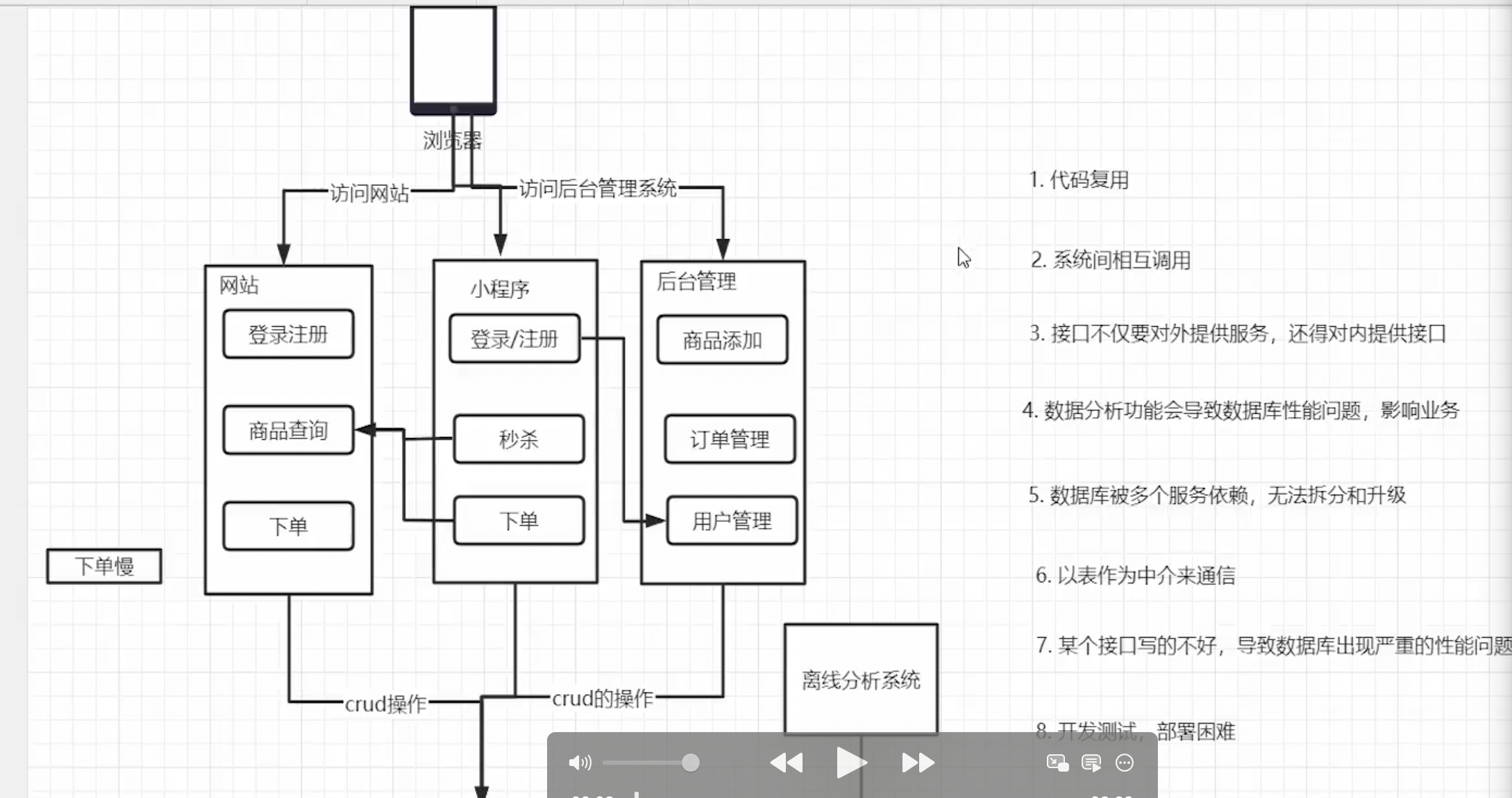
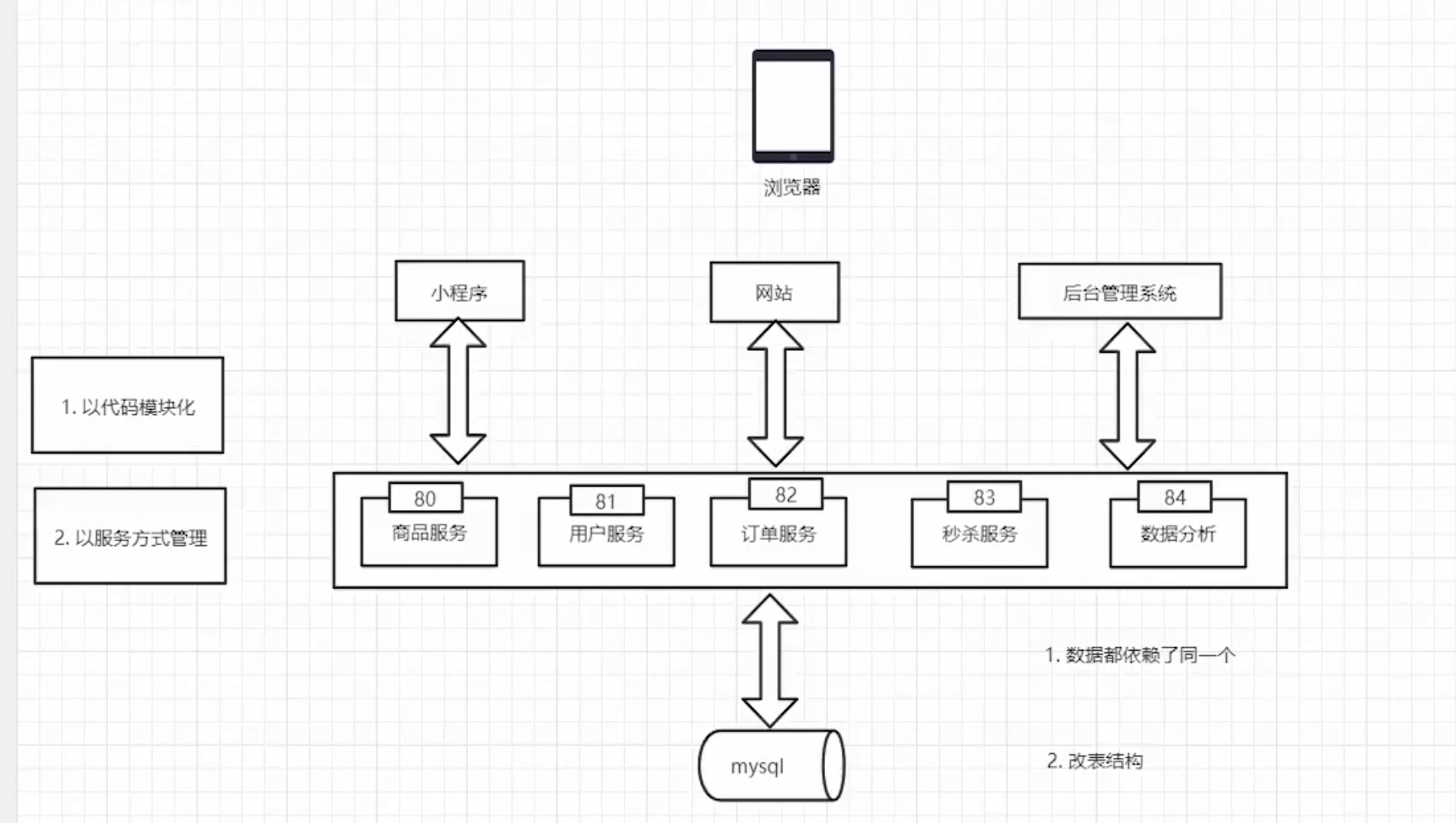
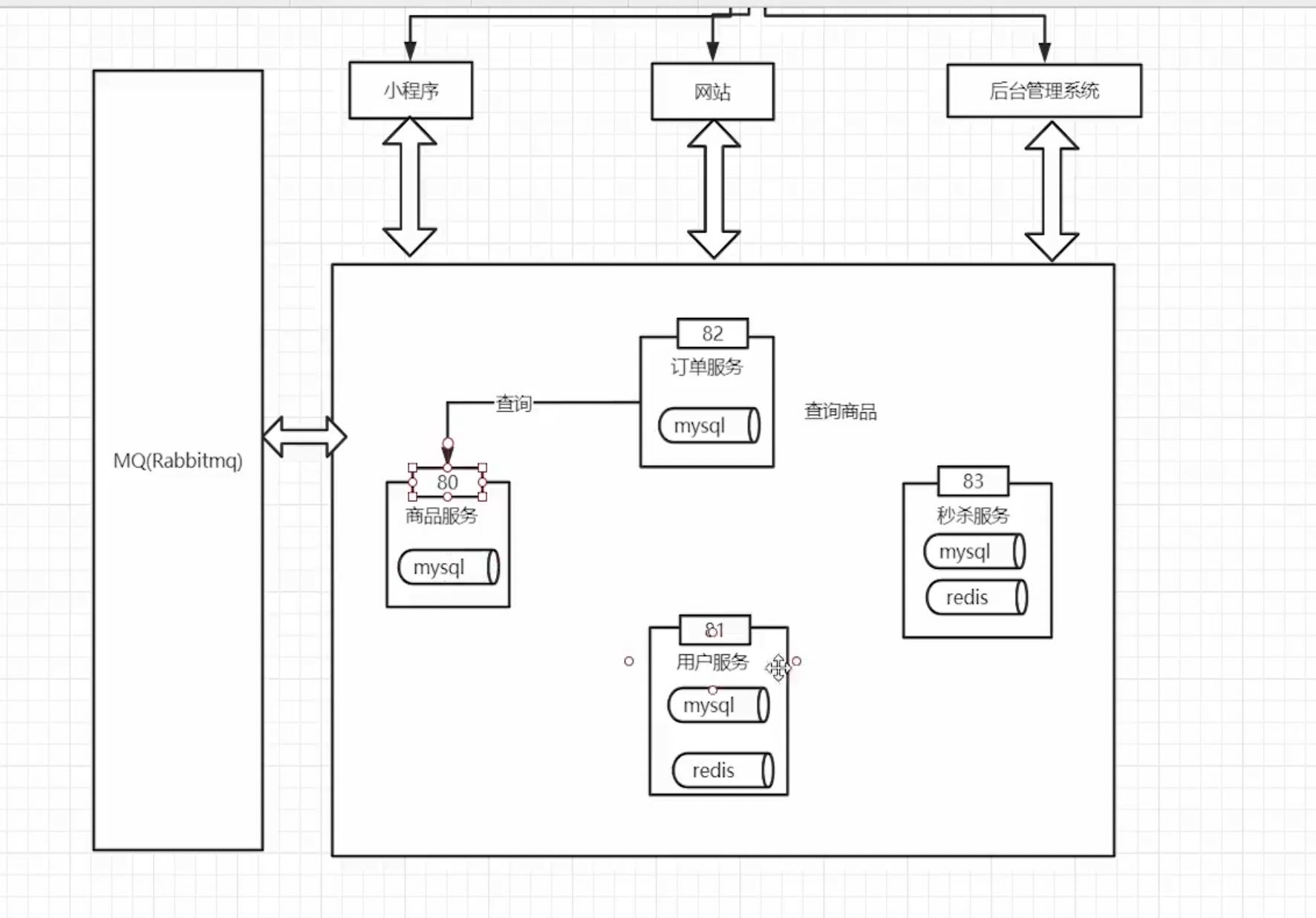
Layered Microservice Architecture
Web Service
SRV Service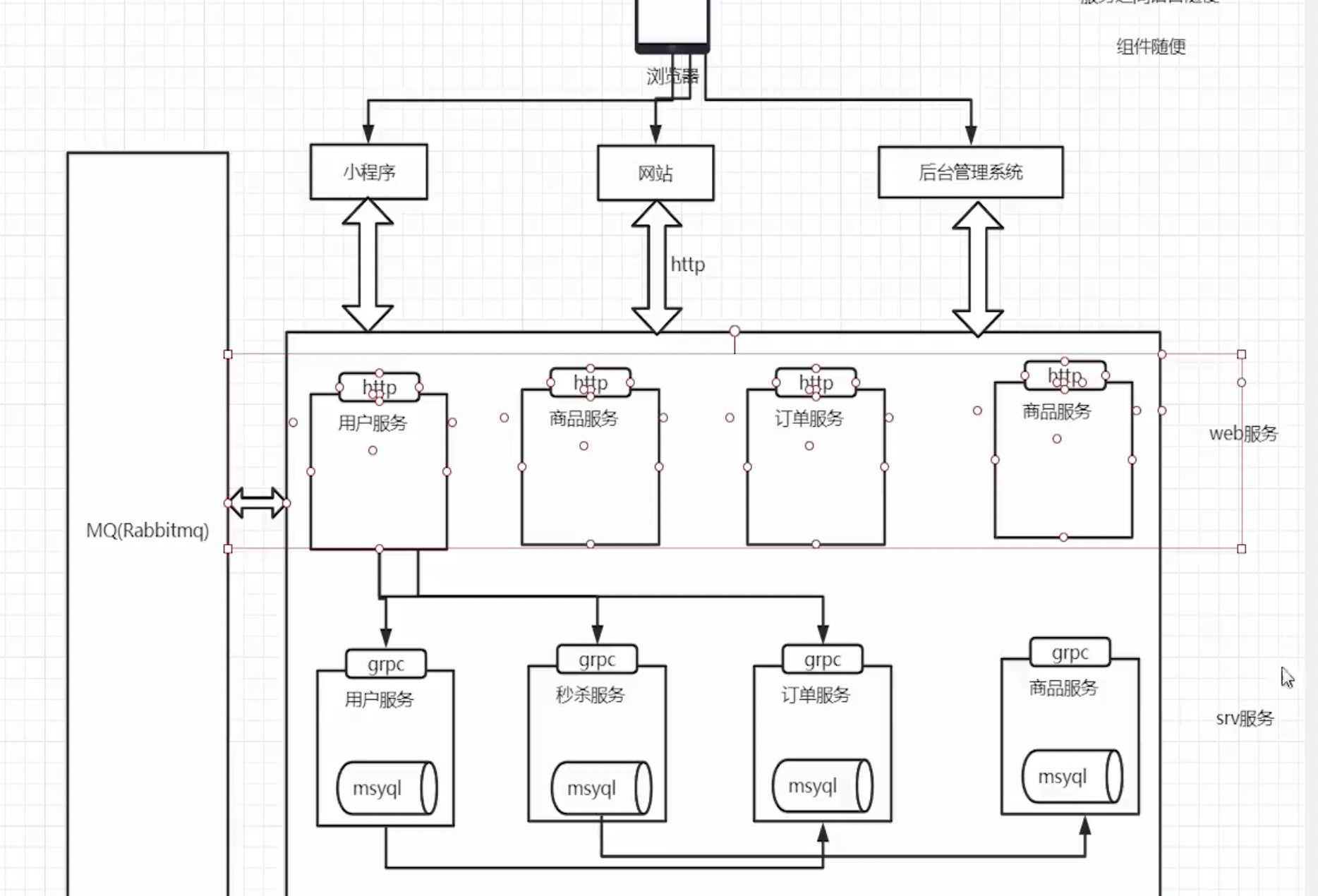
- Registry Center, Service Discovery, Configuration Center, Link Tracing
- API Gateway (Routing, Service Discovery, Authentication, Circuit Breaking, IP Black/Whitelist, Load Balancing)
API Management
API management documentation tools for front-end and back-end separated systems: drf swagger, yapi (I think apifox is better)
git clone https://github.com/Ryan-Miao/docker-yapi.git
cd docker-yapi
docker-compose up
ORM Learning
1. What is ORM
ORM stands for Object Relational Mapping. Its main purpose in programming is to map object-oriented concepts to database table concepts. For example, if I define an object, it corresponds to a table, and an instance of this object corresponds to a record in that table.
2. Common ORMs
3. Pros and Cons of ORM
Pros
- Improves development efficiency.
- Shields SQL details, automatically mapping fields and attributes between entity objects and database tables; no direct SQL coding is required.
- Masks differences between various databases.
Cons
- ORM sacrifices program execution efficiency and can lead to fixed thinking patterns.
- Over-reliance on ORM can lead to insufficient understanding of SQL.
- Heavy reliance on a specific ORM makes switching to other ORMs costly.
4. How to Correctly View the Relationship Between ORM and SQL
- SQL as primary, ORM as supplementary.
- The main purpose of ORM is to increase code maintainability and development efficiency.
GORM Getting Started Tutorial
package main

import (
 "fmt"
 "gorm.io/gorm/logger"
 "log"
 "os"
 "time"

 "github.com/bwmarrin/snowflake"
 "gopkg.in/yaml.v3"
 "gorm.io/driver/mysql"
 "gorm.io/gorm"
)

type Config struct {
 Database struct {
  User     string `yaml:"user"`
  Password string `yaml:"password"`
  Host     string `yaml:"host"`
  Port     int    `yaml:"port"`
  Name     string `yaml:"name"`
 } `yaml:"database"`
}

var node *snowflake.Node

func init() {
 var err error
 // 初始化一个 Node (你可以根据不同服务实例,设置不同的node number)
 node, err = snowflake.NewNode(1)
 if err != nil {
  panic(err)
 }
}

// Product模型
type Product struct {
 Code      string `gorm:"primaryKey"`
 Price     uint
 CreatedAt time.Time
 UpdatedAt time.Time
 DeletedAt gorm.DeletedAt `gorm:"index"`
}

// 插入前自动生成Code
func (p *Product) BeforeCreate(tx *gorm.DB) (err error) {
 if p.Code == "" {
  p.Code = node.Generate().String()
 }
 return
}

func main() {
 // 读取配置
 cfg := loadConfig("config/db/db.yaml")

 // URL编码密码
 //encodedPassword := url.QueryEscape(cfg.Database.Password)
 //fmt.Println(encodedPassword)

 // 拼接DSN
 dsn := fmt.Sprintf(
  "%s:%s@tcp(%s:%d)/%s?charset=utf8mb4&parseTime=True&loc=Local",
  cfg.Database.User,
  cfg.Database.Password,
  cfg.Database.Host,
  cfg.Database.Port,
  cfg.Database.Name,
 )
 // 设置打印日志
 newLogger := logger.New(
  log.New(os.Stdout, "rn", log.LstdFlags), // io writer
  logger.Config{
   SlowThreshold: time.Second * 10,
   LogLevel:      logger.Info,
   Colorful:      true,
  },
 )

 // 连接数据库
 db, err := gorm.Open(mysql.Open(dsn), &gorm.Config{
  Logger: newLogger,
 })
 if err != nil {
  log.Fatal("failed to connect database:", err)
 }
 // 设置全局的logger,这个logger在我们执行每个sql语句时都会打印出来

 fmt.Println("数据库连接成功!", db)
 // 定义表结构,将表结构直接生成对应的表 自动建表
 //db.AutoMigrate(&Product{})
 // 创建一条记录测试
 //product := Product{Price: 100}
 //result := db.Create(&product)
 //if result.Error != nil {
 // panic(result.Error)
 //}
 //
 //fmt.Println("Product Created:", product)
 // read
 var productFind Product
 result := db.First(&productFind, "code = ?", "1916479347485577216")
 if result.Error != nil {
  panic(result.Error)
 }
 fmt.Println("ProductFind Read:", productFind)
 // update
 productFind.Price = 300
 result = db.Save(&productFind)
 // delete 逻辑删除
 db.Delete(&productFind, 1)
}

func loadConfig(path string) Config {
 data, err := os.ReadFile(path)
 if err != nil {
  log.Fatal("failed to read config file:", err)
 }

 var cfg Config
 if err := yaml.Unmarshal(data, &cfg); err != nil {
  log.Fatal("failed to parse config file:", err)
 }

 return cfg
}
Declaring Models
A model is a standard struct, composed of Go's basic data types, custom types that implement the Scanner and Valuer interfaces, and their pointers or aliases.
// 模型定义
type User struct {
    ID            uint           // 主键
    Name          string         // 用户名
    Email         *string        // 邮箱
    Age           uint8          // 年龄
    Birthday      *time.Time     // 生日
    MemberNumber  sql.NullString // 会员编号
    ActivedAt     sql.NullTime   // 激活时间
    CreatedAt     time.Time      // 创建时间
    UpdatedAt     time.Time      // 更新时间
}
Use sql.NullString to solve the problem of 0 or empty values not being updated.
Field Tags
When declaring a model, tags are optional. GORM supports the following tags: tags are case-insensitive, but camelCase style is recommended.
| Tag Name | Description |
|---|---|
| column | Specifies the database column name |
| type | Column data type. It is recommended to use compatible general types, such as: bool, int, uint, float, string, time, bytes, which are supported by all databases and can be used with other tags, such as: not null, size, autoIncrement. You can also use native database types, but they must be complete, e.g., MEDIUMINT UNSIGNED NOT NULL AUTO_INCREMENT. |
| size | Specifies column size, e.g., size:256 |
| primaryKey | Specifies the column as primary key |
| unique | Specifies the column as unique |
| default | Specifies the column's default value |
| precision | Specifies the column's precision |
| scale | Specifies column size |
| not null | Specifies the column as NOT NULL |
| autoIncrement | Specifies the column as auto-incrementing |
| autoIncrementIncrement | Sets the auto-increment step, controlling the increment interval value of the column |
| embedded | Embed the field |
| embeddedPrefix | Adds a prefix to the column name of the embedded field |
| autoCreateTime | Records current time on creation, for int fields, can use nano/milli units. E.g., autoCreateTime:nano |
| autoUpdateTime | Records current time on creation/update, for int fields, can use nano/milli units. E.g., autoUpdateTime:milli |
| index | Creates an index, can create composite indexes for multiple fields with the same name, refer to Indexes documentation |
| uniqueIndex | Same as index, but creates a unique index |
| check | Creates a Check constraint, e.g., check:age > 13, refer to Constraints |
| <- | Sets write permissions for the field, e.g., <-:create for write on creation, <-:update for write on update, <-:false for no write |
| -> | Sets read permissions for the field, e.g., ->:false for no read |
| - | Ignores this field, no read or write |
| comment | Adds comments to fields during migration |
Queries
// 第一条记录,主键排序的第一条
db.First
db.Take
db.Last
db.Where("name=?","jinzhu").First(&user) // user指定找哪张表
db.Where(&user{Name:"jinzhu",Age:20}).First(&user)
//主键切片
db.Where([]int64{20,21,22}).Find(&users)
Gin (Web Framework)
go get -u github.com/gin-gonic/gin
Starting a simple application
package main

import "github.com/gin-gonic/gin"

func main() {
    r := gin.Default()

    r.GET("/ping", func(c *gin.Context) {
        c.JSON(200, gin.H{
            "message": "pong",
        })
    })

    r.Run() // listen and serve on 0.0.0.0:8080
}
package main

import "github.com/gin-gonic/gin"

func main() {

 router := gin.Default()

 // restful 的开发中
 router.GET("/someGet", getting)
 router.POST("/somePost", posting)
 router.PUT("/somePut", putting)
 router.DELETE("/someDelete", deleting)
 router.PATCH("/somePatch", patching)
 router.HEAD("/someHead", head)
 router.OPTIONS("/someOptions", options)

 // 默认启动的是 8080 端口,也可以通过 router.Run(":端口号") 自定义
 router.Run()

}
URL and Route Grouping
package main

import "github.com/gin-gonic/gin"

func main() {

 router := gin.Default()

 // Simple group: v1
 v1 := router.Group("/v1")
 {
  v1.POST("/login", loginEndpoint)
  v1.POST("/submit", submitEndpoint)
  v1.POST("/read", readEndpoint)
 }

 // Simple group: v2
 v2 := router.Group("/v2")
 {
  v2.POST("/login", loginEndpoint)
  v2.POST("/submit", submitEndpoint)
  v2.POST("/read", readEndpoint)
 }

 router.Run() // listen and serve on

}
Parameters in the URL are obtained from Param("key") in the context.
package main

import (
 "github.com/gin-gonic/gin"
 "net/http"
)

type Person struct {
 ID   int    `uri:"id" binding:"required,uuid"`
 Name string `uri:"name" binding:"required"`
}

func main() {
 r := gin.Default()

 r.GET("/ping", func(c *gin.Context) {
  c.JSON(200, gin.H{
   "message": "pong",
  })
 })

 r.GET("/user/:name/:action/", func(c *gin.Context) {
  name := c.Param("name")
  action := c.Param("action")
  c.String(http.StatusOK, "%s is %s", name, action)
 })

 r.GET("/user/:name/*action", func(c *gin.Context) {
  name := c.Param("name")
  action := c.Param("action")
  c.String(http.StatusOK, "%s is %s", name, action)
 })
//  通过struct来约束参数的取值
 r.GET("/:name/:id", func(c *gin.Context) {
  var person Person
  if err := c.ShouldBindUri(&person); err != nil {
   c.Status(http.StatusBadRequest)
  }
  c.JSON(http.StatusOK, person)
 })

 r.Run(":8082")
}
Getting Parameters from GET and POST Requests
GET
package main

import (
 "github.com/gin-gonic/gin"
 "net/http"
)

func main() {
 router := gin.Default()

 // 匹配的 URL 格式:/welcome?firstname=Jane&lastname=Doe
 router.GET("/welcome", func(c *gin.Context) {
  firstname := c.DefaultQuery("firstname", "Guest")
  lastname := c.Query("lastname") // 等价于 c.Request.URL.Query().Get("lastname")

  c.String(http.StatusOK, "Hello %s %s", firstname, lastname)
 })

  router.POST("/welcome", func(c *gin.Context) {
  firstname := c.DefaultPostForm("firstname", "Guest")
  lastname := c.PostForm("lastname") // 等价于 c.Request.URL.Query().Get("lastname")

  c.String(http.StatusOK, "Hello %s %s", firstname, lastname)
 })

 router.Run(":8080")
}
POST
package main

import (
 "github.com/gin-gonic/gin"
 "net/http"
)

func main() {
 router := gin.Default()

 // 匹配的 URL 格式:/welcome?firstname=Jane&lastname=Doe
 router.GET("/welcome", func(c *gin.Context) {
  firstname := c.DefaultQuery("firstname", "Guest")
  lastname := c.Query("lastname") // 等价于 c.Request.URL.Query().Get("lastname")

  c.JSON(http.StatusOK, gin.H{
   "firstname": firstname,
   "lastname":  lastname,
  })
 })

 router.POST("/welcome", func(c *gin.Context) {
  job := c.DefaultPostForm("job", "Guest")
  salary := c.PostForm("salary") // 等价于 c.Request.URL.Query().Get("lastname")

  //c.String(http.StatusOK, "Hello %s %s", job, salary)
  c.JSON(http.StatusOK, gin.H{
   "job":    job,
   "salary": salary,
  })

 })

 router.Run(":8083")
}
Returning JSON and Protobuf Values
package main

import (
 "github.com/gin-gonic/gin"

 "net/http"

 "GormStart/gin06/proto"
)

func main() {
 router := gin.Default()
 router.GET("/moreJSON", func(c *gin.Context) {
  var msg struct {
   Name    string `json:"user"`
   Message string
   Number  int
  }
  msg.Name = "gin"
  msg.Message = "hello"
  msg.Number = 123

  c.JSON(http.StatusOK, msg)
 })

 //protobuf
 router.GET("/moreProtoBuf", func(c *gin.Context) {
  c.ProtoBuf(http.StatusOK, &proto.Teacher{
   Name:   "gin",
   Course: []string{"go", "python"},
  })
 })

 router.Run(":8083")
}
// 返回pureJson
1. Basic Form Validation
To bind the request body to a struct, use model binding, which currently supports binding JSON, XML, YAML, and standard form values (foo=bar&boo=baz).
Gin uses go-playground/validator for parameter validation. View the full documentation.
You need to set tags on the bound fields. For example, if the binding format is JSON, you should set it as: json:"fieldname".
Additionally, Gin provides two sets of binding methods:
Must bind
- Methods:
Bind,BindJSON,BindXML,BindQuery,BindYAML - Behavior: These methods internally use
MustBindWith. If a binding error occurs, the request will be aborted with the following instructions:
go
  c.AbortWithError(400, err).SetType(ErrorTypeBind)
- The affected status code will be set to 400
- Content-Type will be set to
text/plain; charset=utf-8 -
Note: If you set the response code after this, a warning will be issued:
[GIN-debug] [WARNING] Headers were already written. Wanted to override status code 400 with 422 - If you want more control over the behavior, please use the
ShouldBindrelated methods.
Should bind
- Methods:
ShouldBind,ShouldBindJSON,ShouldBindXML,ShouldBindQuery,ShouldBindYAML - Behavior: These methods internally use
ShouldBindWith. If a binding error occurs, an error is returned, allowing developers to properly handle the request and error.
When using binding methods, Gin infers which binder to use based on the Content-Type. If you are sure what you are binding,
you can use MustBindWith or BindingWith.
You can also specify modifiers with specific rules for fields. If a field is decorated with binding:"required",
and its value is empty during binding, an error will be returned.
Example Code (Binding JSON)
// 绑定为 json
type Login struct {
    User     string `form:"user" json:"user" xml:"user" binding:"required"`
    Password string `form:"password" json:"password" xml:"password" binding:"required"`
}

type SignUpParam struct {
    Age        uint8  `json:"age" binding:"gte=1,lte=130"`
    Name       string `json:"name" binding:"required"`
    Email      string `json:"email" binding:"required,email"`
    Password   string `json:"password" binding:"required"`
    RePassword string `json:"re_password" binding:"required,eqfield=Password"`
}

func main() {
    router := gin.Default()
    // Example for binding JSON ({"user":"manu", "password":"123"})
}
package main
import (
 "fmt"
 "github.com/gin-gonic/gin"
 "github.com/gin-gonic/gin/binding"
 "github.com/go-playground/locales/en"
 "github.com/go-playground/locales/zh"
 ut "github.com/go-playground/universal-translator"
 "github.com/go-playground/validator/v10"
 en_translator "github.com/go-playground/validator/v10/translations/en"
 zh_translator "github.com/go-playground/validator/v10/translations/zh"
 "net/http"
 "reflect"
 "strings"
)
// 绑定为 json
type LoginForm struct {
 User     string `form:"user" json:"user" xml:"user" binding:"required"`
 Password string `form:"password" json:"password" xml:"password" binding:"required"`
}
type RegisterForm struct {
 Age        uint8  `json:"age" binding:"gte=1,lte=130"`
 Name       string `json:"name" binding:"required,min=3"`
 Email      string `json:"email" binding:"required,email"`
 Password   string `json:"password" binding:"required,min=6"`
 RePassword string `json:"re_password" binding:"required,eqfield=Password"` // 跨字段了
}
var trans ut.Translator
// 翻译
func InitTrans(locale string) (err error) {
 if v, ok := binding.Validator.Engine().(*validator.Validate); ok {
  v.RegisterTagNameFunc(func(fld reflect.StructField) string {
   name := strings.SplitN(fld.Tag.Get("json"), ",", 2)[0]
   if name == "-" {
    return ""
   }
   return name
  })
  zhT := zh.New()
  enT := en.New()
  uni := ut.New(enT, zhT)
  trans, ok = uni.GetTranslator(locale)
  if !ok {
   return fmt.Errorf("locale %s not found", locale)
  }
  switch locale {
  case "en":
   en_translator.RegisterDefaultTranslations(v, trans)
                                                        主题测试文章,只做测试使用。发布者:Walker,转转请注明出处:https://walker-learn.xyz/archives/4774
