
Micro-frontends
JS Isolation
CSS Isolation
Element Isolation
Lifecycle
Preloading
Data Communication
Application Navigation
Multi-level Nesting
Description
- Uses Mermaid's flowchart syntax, supported by Markdown renderers like Typora, VitePress, and some Git platforms.
- Retained:
- Base application
main-vue3 - Sub-applications:
child-nuxt2-home,child-vue2-job,child-vue3-enterprise,child-react18-about - Core logic of the framework, such as JS isolation, style isolation, lifecycle, application communication, virtual routing, etc.
- Initialization process on the right
◆ Multiple cutting-edge technology stacks
◆ Multi-project hands-on practice, one person playing multiple roles
◆ Micro-frontend application scenarios, implementation solutions
◆ Monolithic application development process
◆ Architectural thinking, architectural capabilities
◆ Building enterprise-level micro-frontend applications
Two Questions
- What are Micro-frontends?
- Background: Spaghetti code (development, running, packaging, but it cannot be discarded, and new requirements must be incrementally added to the project) [Monolithic Application]
- Basic Concept: First appeared in 2016 (borrowing from microservices architecture)
- Core Idea: Container application (main application) and sub-applications (micro-applications)
- Use Cases
- Incremental upgrades, reduced conflicts, improved efficiency
- Flexibility (technology stack agnostic), can use different build tools
- Stability: Each micro-application performs its own duties, aggregated platform
- Independence: Independent development, testing, deployment
- iframe single-spa qiankun micro-app
<iframe src="https://www.example.com" sandbox></iframe>Simple and easy to use, natural sandbox (complete isolation), isolation is too perfect, refresh means loss (long white screen time, slow loading speed)
-
single-spa is the earliest micro-frontend framework (single-page micro-frontend mode), maintaining a base routing table on the base application, the progenitor of micro-frontend frameworks. It has high refactoring costs, imperfect sandboxing, poor application communication capabilities (single-page), and does not support esmodule, thus also not supporting vite
```js
// 1. 注册
// 2. 加载
import { registerApplication } from 'single-spa';registerApplication({
name: 'app',
app: () => {
loadScripts('./chunk-a.js');
loadScripts('./chunk-b.js');
return loadScripts('./entry.js');
},
});singleSpa.start();
``` - Qiankun also has improvements over basic single-spa
- It uses HTML entry
- More complete sandbox solution
- High adaptation cost, also requires some changes to the base and sub-applications, does not support vite
-
Micro-app (JD Technology Team)
- Low invasiveness (low adaptation cost), out-of-the-box
- Easy-to-read documentation
- Better compatibility (supports webpack, vite)
- Why learn?
Modern Micro-frontend Architecture Theory
Previously achieved by configuring different entry points via Nginx
- Team autonomy: Difficult for cross-team collaborative development
- Core idea: Development and deployment costs
- Scenario implementation: System's progressive and dynamic nature
graph LR
  主分支[主分支] -->|git仓库| 分支1
  主分支 --> 分支2
  主分支 --> 分支3
  主分支 --> 分支4

  分支1 --> 团队1
  团队1 -->|commit| 赵 --> 钱 --> 孙

  分支2 --> 团队2
  团队2 -->|commit| 李 --> 周 --> 吴

  分支3 --> 团队3
  团队3 -->|commit| 郑 --> 王 --> 冯

  分支4 --> 团队4
  团队4 -->|commit| 陈 --> 褚 --> 卫
Each repository will be deployed independently
graph LR
  主分支[主分支] -->|git仓库| 团队1仓库
  主分支 --> 团队2仓库
  主分支 --> 团队3仓库
  主分支 --> 团队4仓库

  团队1仓库 -->|commit| 赵 --> 钱 --> 孙
  团队2仓库 -->|commit| 李 --> 周 --> 吴
  团队3仓库 -->|commit| 郑 --> 王 --> 冯
  团队4仓库 -->|commit| 陈 --> 褚 --> 卫
Independent development (each application is an independent application)
Technology Stack Selection
Micro-frontend frameworks are technology-agnostic; we can choose any front-end technology framework.
Micro-frontend Application = Micro-frontend Framework + JS Framework + UI Framework + Build Tool
- Micro-frontend Framework: Micro-app
- JS Frameworks: Vue3, Vue2, Nuxt2, React18
- UI Frameworks: Element-ui, Element-plus
- Build Tools: Webpack5, Vite4, Vue-cli5
Overall architectural approach is CustomElement + HTMLEntry:
- micro-app tag: Various configurations can be set on it, such as enabling iframe sandbox, enabling SSR mode, enabling keep-alive mode, disabling sandbox, and data communication.
- HTMLEntry: Renders with an HTML file as the entry address.
Main Features:
Lifecycle, environment variables, virtual routing, JS sandbox, style isolation, element isolation, data communication, etc.
Lifecycle
- created: Triggered after the
<micro-app>tag is initialized and before resources are loaded. - beforemount: Triggered after resources are loaded and before rendering begins.
- mounted: Triggered after the sub-application has finished rendering.
- unmount: Triggered when the sub-application is unmounted.
Environment Variables
__MICRO_APP_PUBLIC_PATH____MICRO_APP_BASE_ROUTE__
Virtual Routing System
Through the virtual routing system, we can easily implement navigation guards and cross-application jumps, improving development efficiency. Furthermore, sub-applications run within this virtual routing system, isolated from the main application's routing, preventing mutual interference, such as:
- Main application controls sub-application navigation
- Sub-application controls main application navigation
- Sub-application controls other sub-application navigation
JS Sandbox
Ensures no conflicts in global variables/events between sub-applications
Style Isolation
Ensures styles between sub-applications do not interfere with each other
.test {
  color: red;
}

/* 转换为 */
micro-app[name='xxx'] .test {
  color: red;
}
Element Isolation
The concept of element isolation comes from ShadowDom, meaning elements within ShadowDom can be duplicated with external elements without conflict. micro-app simulates ShadowDom-like functionality:
- Elements will not escape the
<micro-app>element boundary. - Sub-applications can only perform create, delete, update, and read operations on their own elements.
Communication
Main-sub communication
Sub-application global communication
Other Capabilities
Preloading, caching, etc.
System Architecture
graph TD
    A[基座应用 main-vue3] -->|Login| B[micro-app 框架逻辑]
    B --> C[JS 隔离]
    B --> D[样式隔离]
    B --> E[元素隔离]
    B --> F[生命周期]
    B --> G[应用通信]
    B --> H[虚拟路由系统]
    B --> I[预加载]
    B --> J[资源地址补全]
    B --> K[...]

    B --> L[子应用 child-nuxt2-home]
    B --> M[子应用 child-vue2-job]
    B --> N[子应用 child-vue3-enterprise]
    B --> O[子应用 child-react18-about]

    P[初始化 micro-app] --> Q[嵌入子应用]
    Q --> R[通用组件]
    R --> S[统一鉴权]
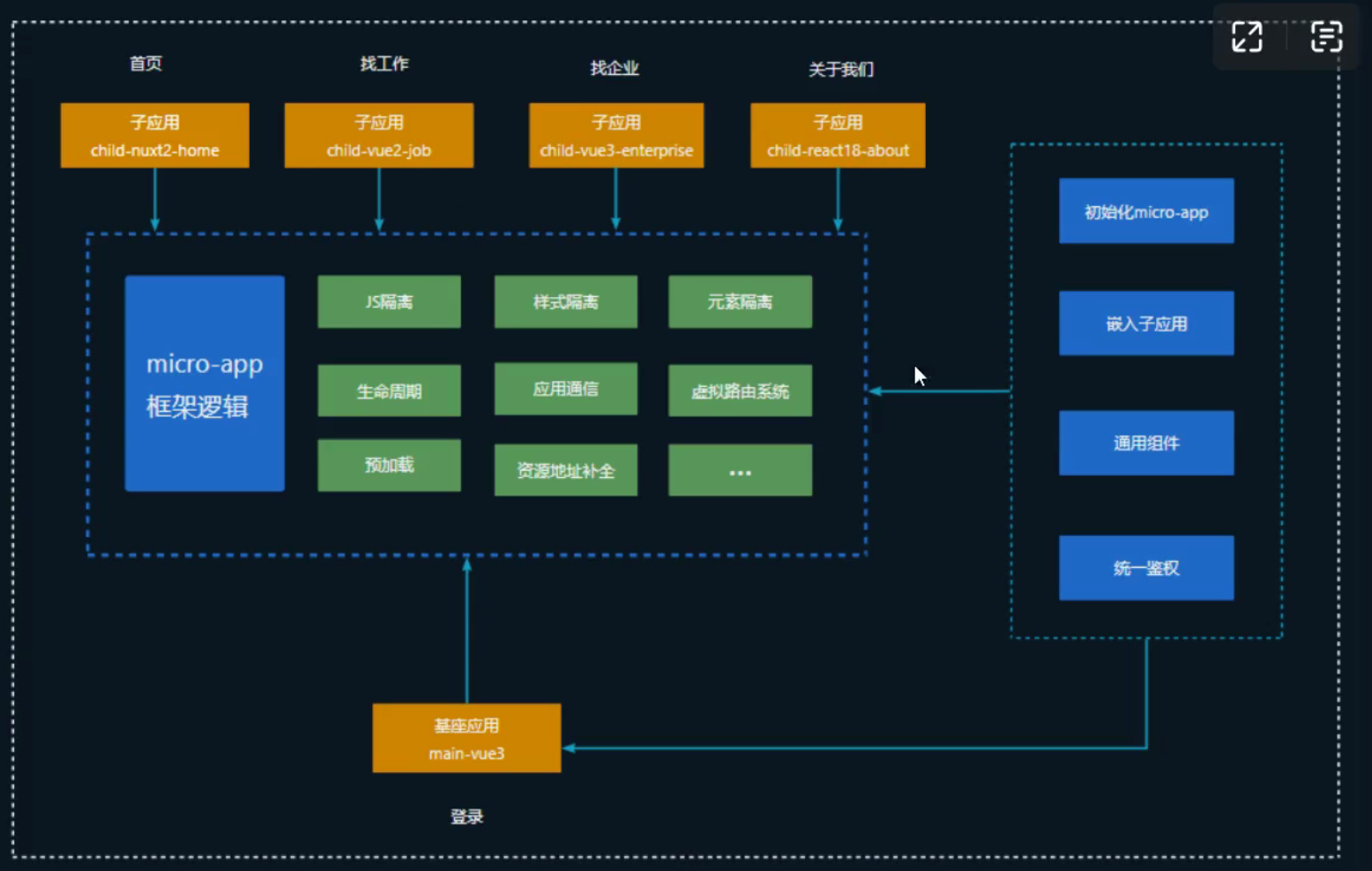
4 sub-applications and 1 main application
nvm for Node.js Version Management
What is nvm?
nvm is a Node.js package manager that helps us use different Node.js versions in different project environments, so you might encounter errors when enabling different projects.
For example, if we use Nuxt3 and Vite to build different projects in this tutorial, they rely on different Node.js environments.
- Nuxt3 requires Node.js version >= v14.16.0
- Vite >= 12.0.0
Therefore, our computer needs to be configured with two Node.js versions, using the corresponding Node.js environment in our current project. How can different Node.js versions coexist on the system? See below.
nvm Installation
Download
Download, select a version of nvm, and install nvm-setup.zip.
Functional Allocation of Main and Sub-applications
Main Application: Base (main-vue3)
Function: Obtain token and dispatch it to various sub-applications
- Login /api/auth/login POST
- Logout /api/auth/logout POST
API Description:
- Login: Pass username and password, return token.
- Logout: Clear token.
// POST /api/auth/login
{
  "username": "test",
  "password": "123456"
}
// 返回
{
  "token": "mocked-token-123"
}
Sub-application: Home (child-nuxt2-home)
Function:
- Home List /api/home/list GET
Mock example:
// GET /api/home/list
[
  { "id": 1, "title": "Home内容一" },
  { "id": 2, "title": "Home内容二" }
]
Sub-application: Find Job (child-vue2-job)
Function:
- Job List /api/job/list GET
- Job Details /api/job/detail/:id GET
Mock example
// GET /api/job/list
[
  { "id": 101, "title": "前端开发", "company": "阿里巴巴" },
  { "id": 102, "title": "后端开发", "company": "腾讯" }
]

// GET /api/job/detail/101
{
  "id": 101,
  "title": "前端开发",
  "description": "负责前端页面开发",
  "company": "阿里巴巴"
}
Sub-application: Find Enterprise (child-vue3-job)
Function:
- Company List /api/company/list GET
- Company Details /api/company/detail/:id GET
Mock example:
// GET /api/company/list
[
  { "id": 201, "name": "字节跳动", "industry": "Internet" },
  { "id": 202, "name": "百度", "industry": "AI" }
]

// GET /api/company/detail/201
{
  "id": 201,
  "name": "字节跳动",
  "industry": "Internet",
  "location": "北京"
}
Sub-application: About Us (child-react18-about)
Function:
- About Us /api/about/info GET
Mock example:
// GET /api/about/info
{
  "company": "微前端平台",
  "description": "一个多技术栈集成的企业级系统"
}
- Mock Server Tool Recommendations:
- Use Mock Service Worker (MSW) (suitable for Vue/React/Nuxt, etc.)
- Or local Node.js server + json-server/mockjs
- Unified API Management:
- Each sub-application maintains its own API configuration
- Main application uniformly configures common APIs (e.g., authentication-related)
- Front-end and Back-end Debugging Methods:
- Use Axios interceptors to uniformly handle tokens
- Sub-applications control whether to enable mock via environment variables
Implementing the Base Application
Currently using Node.js (v18.20.6)
pnpm create vue@latest
# ts
# pina
# vue-router
cd micro-main-vue3
pnpm install
pnpm dev
# 安装相关依赖 router
# /router目录下放置路由
# /views目录下放视图
# /views/child目录下放子应用路由
# /views/main目录下放基座应用的视图
# 安装element plus
- Integrate microapp into the base application
@micro-zoe/micro-app
- Import and initialize it in the project's main.js; see GitHub for specific implementation.
import microApp from '@micro-zoe/micro-app';

microApp.start();
Using Nuxt2 to Implement the Home Application (child-nuxt3-home)
It is a Vue3-based server-side rendering project (the version I learned uses Vue3, and I also use Nuxt3).
pnpm create nuxt-app child-nuxt3-home
After feature development is complete, integrate it into the base application using <micro-app name="child-app" url="http://localhost:3000/child-home"></micro-app>. However, it will prompt a cross-origin issue. We can add a Chrome extension to test allowing cross-origin requests, the extension name is: Allow CORS: Access-Control-Allow-Origin
Using Vue2 to Build a Sub-application for Finding Jobs (micro-child-vue2-job)
micro-child-vue2-job/
├── public/
│ └── index.html
├── src/
│ ├── assets/
│ ├── components/
│ ├── views/
│ ├── App.vue
│ ├── main.js
│ └── router.js
├── .gitignore
├── babel.config.js
├── package.json
└── README.md
Vue3 Builds a Sub-application for Finding Enterprises (micro-child-vue3-enterprise)
2024-04-12
API Mock Adjustment and List Data Display
Feature Changes
- Add API proxy configuration
-
Add
.env.developmentfile to configure environment variables - Add proxy configuration in
vue.config.jsto support API forwarding -
Configure mock API address:
http://127.0.0.1:4523/m1/6202454-5895755-default - Adjust job list styles
- Remove list container background color
- Optimize job card styles
- Adjust font size and color
- Add card hover effect
- Optimize tag styles
- Improve list data display
- Display basic job information (title, salary)
- Display company information (Logo, name, industry)
- Display job tags (location, experience, education)
- Display welfare tags
- Display skill tags
- Add pagination feature
File Changes
- New files:
-
.env.development: Environment configuration file - Modified files:
src/api/findJobApi.js: Add API debugging logssrc/assets/scss/findjob.scss: Adjust stylessrc/utils/request.js: Adjust request configurationsrc/views/FindJob.vue: Improve list displayvue.config.js: Add proxy configuration
API Data Structure
{
  "code": 200,
  "message": "success",
  "data": {
    "list": [
      {
        "jobId": "job-100",
        "jobTitle": "Product Manager",
        "enterpriseName": "腾讯科技",
        "enterpriseLogo": "https://logo.clearbit.com/mi.com",
        "industry": "人工智能",
        "jobType": "全职",
        "education": "本科",
        "workCity": "北京市",
        "workExperience": "1年",
        "salaryMin": 10642,
        "salaryMax": 17846,
        "salaryRange": "10642-17846元/月",
        "salaryUnit": "月",
        "welfareTags": ["五险一金", "交通补贴", "加班补助"],
        "skillTags": ["Python", "TensorFlow", "PyTorch"],
        "refreshTimeStr": "Apr 12, 2024"
      }
    ],
    "total": 25
  }
}
Style Guide
- Main color: #4e6ef2
- Title text: 16px, #333
- Salary text: 16px, #ff6b6b
- Normal text: 13px, #666
- Secondary text: 12px, #999
- Tag styles:
- Background color: #f8f9fc
- Text color: #666
- Border-radius: 2px
- Card styles:
- Background color: #fff
- Padding: 24px
- Border-radius: 4px
- Shadow: 0 1px 3px rgba(0, 0, 0, 0.02)
Create React Application
npx create-react-app micro-child-react18-about
A micro-frontend sub-application based on React 18, supporting independent operation and running as a sub-application.
Project Structure
micro-child-react18-about/
├── public/                 # Static assets directory
├── src/                    # Source code directory
│   ├── components/         # Common components
│   │   └── Layout/        # Layout components
│   ├── pages/             # Page components
│   │   └── About/         # About page
│   ├── styles/            # Style files
│   │   └── global.scss    # Global styles
│   ├── utils/             # Utility functions
│   │   └── request.js     # Request encapsulation
│   ├── App.js             # Application entry component
│   ├── index.js           # Application entry file
│   └── public-path.js     # Micro-frontend environment configuration
├── .env                    # Environment variables
├── package.json           # Project dependency configuration
└── README.md              # Project README
Micro Sandbox (JS Isolation)
new Fuction("return window")()(0,eval)("window")window.rawWindow
For example, if several sub-applications might use job types, we can extract them to the base application. Additionally, in sub-applications, we can access them via window.__MICRO_APP_PUBLIC_PATH__.
If a warning appears in the main application indicating that micro-app is not recognized, but it doesn't affect usage, we need to add some configuration in the main application, specifically in the base application's vite.config.js.
//...
plugins: [
  vue({
    template: {
      compilerOptions: {
        isCustomElement: (tag) => /^micro-app/.test(tag),
      },
    },
  }),
];
// ..
Logic for using base application data
mounted() {
  if (window.__MICRO_APP_ENVIRONMENT__) {
    // 微前端环境
    this.jobTypeArr = window.rawWindow.jobTypeArr;
  } else {
    this.jobTypeArr = jobTypeArr;
  }
  // this.getAddressDict();
  // this.searchJobList();
}
Style Isolation (Enabled by default)
Isolate by setting a prefix in the base application, using namespaces.
<el-config-provider namespace="ep">
  <common-header v-if="route.name !== 'login'" />
  <main-container />
  <common-footer v-if="route.name !== 'login'" />
</el-config-provider>
Create an SCSS file to
// styles/element/index.scss
// we can add this to custom namespace, default is 'el'
@forward 'element-plus/theme-chalk/src/mixins/config.scss' with (
  $namespace: 'ep'
);
// ...
Comment out the import import 'element-plus/dist/index.css' in main and replace it with the SCSS file.
Declare in vite.config configuration
css: {
  preprocessorOptions: {
    scss: {
      additionalData: `@use "./src/styles/element/index.scss" as *;`,
    },
  },
},
Element Isolation
shadow dom elements can be duplicated without conflict, and all elements will not escape the boundary of micro-app.
Lifecycle (micro-app)
You can configure lifeCycles on `start`, or use `@mounted` on each standard to set for each sub-application.
Main-sub Communication
Add data to the micro-app tag
import microApp from '@micro-zoe/micro-app'
const globalData = microApp.getGlobalData()
<micro-app :data="globalData"></micro-app>
In the sub-application project
if (window.__MICRO_APP_ENVIROMENT__) {
  const dataForchild = window.microApp.getData();
  // 获取数据对象
  const { token } = dataForChild;
  axios.defaults.headers['x-client-token'] = token;
}
You can also use microApp.setData('childEnterprise',data) to set it; this name must be consistent with the micro-app's name.
Sub-application sends data to main application
if (window.__MICRO_APP_ENVIRONMENT__) {
  window.microApp.dispatch({
    activeIndex: 'job',
  });
}
// 在基座应用中获取数据
<script setup>
function handleDataChange(e) {
  let { activeIndex } = e.detail.data;
  localStorage.setItem('activeIndex', activeIndex);
}
</script>

<template>
  <div>
    <micro-app
      @datachange="handleDataChange"
      name="childHome"
      url="http://localhost:3000/childHome/"
    ></micro-app>
  </div>
</template>

<style></style>
Inter-sub-application Communication
Click search in the home application and pass the keyword to the job search sub-application.
- Check if it's a micro-frontend environment
- Send data to the base application
searchIt() {
  let { homeSearchValue } = this;
  if (window.__MICRO_APP_ENVIRONMENT__) {
    window.microApp.setGlobalData({ homeSearchValue });
    const baseRouter = window.microApp.router.getBaseAppRouter();
    baseRouter.push('/main/childJob');
  }
},
// 应用启动时要注册其路由信息
microApp.router.setBaseAppRouter(router) //router是基座路由信息
// 在找工作子应用的mounted中把数据拿出来添加到查询接口的参数中
const globalData = window.microApp.getGlobalData()
if(globalData){

}
Main application navigating to sub-applications has already been handled in the base application's routing. How to navigate from a sub-application to the main application (with page refresh, without page refresh)?
// 1.
window.microApp.location.href = '/main/login';
// 2
// 获取基座应用的路由然后来设置
const baseRouter = window.microApp.router.getBaseAppRouter();
baseRouter.push('/main/login');
Micro-frontend Application Optimization
Preloading: requestIdleCallback loads resources when the browser is idle. In the base application, add the prefetchApps property to the start({}) object.
import microApp from '@micro-zoe/micro-app';

microApp.start({
  prefetchApps: [
    {
      name: 'childHome',
      url: 'http://localhost:3000/childHome/',
      level: 3,
    },
    {
      name: 'childJob',
      url: 'http://localhost:8080',
      level: 3,
    },
    {
      name: 'childEnterprise',
      url: 'http://localhost:3002/child/findEnterprise/',
      level: 3,
      iframe: true,
    },
    {
      name: 'childAbout',
      url: 'http://localhost:3003/',
      level: 3,
    },
  ],
});
Must be consistent with the tag's configuration.
Configure front-end resource sharing: load once, and other sub-applications retrieve from cache when loading.
globalAssets item configuration, but this configuration is not ideal. You can add a `global` attribute to link and script tags in index.html to identify them.
<link global rel="stylesheet" href="xx.css" />
<script global src="xx.js"></script>
Sub-application caching,
keep-alivewill not actually be unmounted. The loading lifecycle is afterHide beforeShow afterShow.Smooth Transitions
Page loading animation (or skeleton screen): it disappears after the base application loads. Pay attention to a few points: the front-end loading after the base application finishes loading, the loading before and after micro-app loads, and before and after the sub-application renders. Another point is the performance optimization of each individual sub-application.
Graceful Deployment
This is no longer my learning focus; I'll just skim through it. If you need to know more, please refer to other courses.
Each application is packaged and deployed separately, integrated into the base application. Deploy sub-system applications first, then deploy the base application.
Deployment Tools
- Putty
- Xftp
Server Environment Dependencies
- Nodejs 16.11.0
- Nginx
- Screen
Online Domain
- localhost
- Online domain
- 📘 Unified management of local and online URLs
Go Live
🚩 Sub-application Deployment
- Nuxt2 Sub-application
- Vue2 Sub-application
- Vue3 Sub-application
- React18 Sub-application
- Gzip Compression
🟡 Base Application Deployment
- Vue3 Main Application
Multi-page Application
MPA (Multi-page Application) is different from our micro-frontend architecture (single technology architecture). One should not pursue technology for technology's sake. Implementing a multi-page application with Vue2 (which is also not the focus here).
主题测试文章,只做测试使用。发布者:Walker,转转请注明出处:https://walker-learn.xyz/archives/4451

![Go Engineer System Course 004 [Study Notes]](https://walker-learn.xyz/wp-content/themes/justnews/themer/assets/images/lazy.png)